Twitter Video Finder: How to Locate Any Clip on X Fast
You remember the clip, but not the account that posted it. Maybe it appeared in your feed during a fast-moving news story, carried a watermark you couldn’t read, or showed a product format you want to study. Searching for it again can turn into endless scrolling, especially when the most visible post is a repost rather than the original.
A useful Twitter video finder workflow treats the task as three separate jobs: discovering the clip, retrieving a usable post or media reference, and verifying where the footage came from. That distinction matters for creators seeking credit, researchers tracing how a story spread, marketers studying competitor formats, and journalists checking whether a viral video is original or misattributed. The broader rise of video explains the pressure. Historical reporting described roughly 1.2 billion daily video views on Twitter in 2019, with that figure representing 2x growth over the previous 12 months. Other coverage from the same period reported more than 2 billion daily video views and 67% year-on-year growth, as summarized by historical reporting on X video analytics.
The interface also creates false confidence. X supports search refinement, but it doesn’t expose a clean, dedicated video-only filter in its advanced-search interface. Location searches are weaker still because geotagged posts account for under 1% of all posts, according to the X Advanced Search documentation. For authenticity checks, resources such as verify videos with AI Video Detector can complement, rather than replace, source tracing. The same discipline applies when comparing platform discovery habits, including the differences discussed in Threads versus Twitter in 2026.
Table of Contents
- The Real Problem Behind Finding a Twitter Video
- Where to Look Inside the X App and on the Web
- Advanced Search Operators That Surface Videos
- What the API and Embeds Actually Return
- Verifying the Clip Once You Have Found It
- Rights, Attribution, and When Not to Use a Clip
The Real Problem Behind Finding a Twitter Video
A creator sees a short cooking clip, remembers one line from the caption, and wants to credit the person who made it. The visible post has thousands of reposts, but the original account is unclear. A researcher may have the opposite problem: they know the clip is connected to a developing story, but need to establish which account uploaded it first and whether the footage predates the claim attached to it.
Marketers use the same search process differently. They may be looking for recurring video structures from competing accounts, such as product demonstrations, customer reactions, or text-led explainers. A journalist needs a stricter result. Finding a playable video isn’t enough if the post recycles footage from another platform or gives an old event a new caption.
Practical rule: Finding the loudest post is not the same as finding the source.
That makes “Twitter video finder” shorthand for a layered workflow:
- Discovery: Surface likely posts using profiles, phrases, dates, and search operators.
- Retrieval: Open the public post, preserve its URL, and identify a dependable way to view or embed the clip.
- Verification: Compare upload timing, visible watermarks, captions, profiles, and copies elsewhere.
The third job is where most quick guides stop too early. The Media tab can surface content from an account, but it can’t tell you whether that account created the footage. A repost may have better engagement, clearer context, or a more searchable caption than the first upload.
X’s search surfaces also have blind spots. A location-based query sounds useful for finding an event video, yet sparse geotagging means it can omit most relevant posts. Search therefore works best when you combine several weak clues, such as a distinctive phrase, an account, a narrow date range, and a visual detail from the video.
Where to Look Inside the X App and on the Web
Start with the least complicated surface that matches what you remember. If the clip was part of a live news cycle, open Explore, search a distinctive word or phrase, and switch from Top to Latest. Top results favor posts that have already accumulated attention, while Latest is more useful when you’re trying to reconstruct the order in which people shared footage.

Search results may show a Videos chip, but treat it as a starting point rather than a perfect video-only result. Images and other media can still appear, so inspect each card and refine the query when the result set drifts. The dedicated media search at x.com/search/media is useful for browsing media-heavy results, especially when you already have a phrase or account to anchor the search.
Match the surface to the clue
If you know the account, go directly to its profile and open the Media tab. This is usually faster than searching the entire platform, and it lets you inspect neighboring posts for context. Look above and below the target post for a thread, correction, or earlier version.
If you only remember a topic, use Explore and search first. Trending video rails can expose active conversations, but they’re poor tools for older clips because the ranking changes and popular reposts can overwhelm the original. For a clip tied to a recent event, search by a phrase from the caption, then choose Latest and work backward.
- Known account: Profile, then Media.
- Known wording: Search phrase, then Videos or Latest.
- Known event: Explore, event terms, date refinement.
- Known post URL: Open the post directly and preserve the link before doing anything else.
A practical distinction: Use X’s native surfaces to locate the post. Use a separate workflow only when you need preservation, download guidance, or deeper verification.
If your next step is saving a clip for editing or reference, review how to download X clips easily before choosing a third-party utility. Also remember that unusual visibility can affect what appears in search, so a missing result shouldn’t automatically be treated as proof that the post never existed. The troubleshooting context in this guide to Twitter shadowbans can help you separate search failure from account-level visibility issues.
Advanced Search Operators That Surface Videos
A precise operator combination can surface a clip that a broad keyword query misses. These operators narrow the search, while the result cards still require manual checking because X does not provide a universal, dedicated video filter across every search surface.
Start with wording likely to appear in the post text or transcript. Put a distinctive caption in quotation marks, then add an account, date range, or exclusion. Useful combinations include:
"red jacket interview" filter:videosfrom:exampleaccount filter:videos"warehouse fire" since:2026-06-01 until:2026-06-03"full statement" filter:videos -filter:retweets"product demo" from:brandname since:2026-05-01 until:2026-05-31
Operator behavior varies across X surfaces, so inspect the returned cards instead of assuming every result contains video. filter:videos remains useful as a refinement signal. -filter:retweets reduces duplicated distribution and can make the earliest credible upload easier to spot.
If a query returns nothing, remove one constraint at a time. An exact phrase may be absent from the post even when the clip is still available. Run an unfiltered phrase search before adding an account filter, since restricting the account can hide the original uploader when that account is unknown.
A working operator reference
| Operator | What it does | Example |
|---|---|---|
from: |
Limits results to an account | from:accountname interview |
filter:videos |
Requests video-focused results where supported | launch filter:videos |
since: |
Sets the beginning of a date range | since:2026-06-01 |
until: |
Sets the end boundary for a date range | until:2026-06-03 |
-filter:retweets |
Excludes retweets from the result | event -filter:retweets |
| Quotation marks | Searches an exact phrase | "breaking update" |
lang: |
Restricts results by language | lang:en interview |
Dates work best when you know the likely news window. For an event-related clip, begin with the likely day, inspect the earliest credible posts, and widen the range only when necessary. Account filters help when the source is known, but they can remove useful leads when the first uploader is unidentified.
The platform’s search documentation supports refinement by words, accounts, language, places, and dates. Video discovery still depends on post-level inspection after the query runs. Use operator refinement plus manual inspection, then compare captions, timestamps, account history, and neighboring posts to determine whether you found the source or only a later copy.
What the API and Embeds Actually Return
A technical Twitter video finder can fail before it ever reaches the file. The main reason is that X’s API versions don’t expose media in the same way. X v2 does not currently expose video or GIF media URLs, while v1.1 responses may include a media object with extended_entities.media[].video_info.variants, as described in X developer community guidance on video media variants.
That v1.1 structure can contain several encodes for one post. You may see multiple MP4 files at different bitrates, alongside WebM or HLS streams. The variants aren’t guaranteed to arrive in a useful order, and bitrate, resolution, and file size aren’t always surfaced consistently. A pipeline that selects the first entry can therefore choose an inconvenient stream or fail on a format the downstream tool doesn’t support.
Why MP4 is the sensible default
For broad compatibility, default to MP4 when an MP4 variant is available. It generally creates fewer problems for ordinary review, editing, and local playback than choosing WebM or HLS without checking the consumer’s requirements. That doesn’t mean the highest-quality file is always first. Your code or workflow should inspect available variants, prefer a compatible MP4, and retain the original post URL as provenance.
When v2 returns the post but no usable video URL, don’t treat the missing field as evidence that the tweet contains no video. It may reflect the API’s media limitations rather than the post itself. A solid process records the tweet ID, checks the available media representation, and falls back to an embed when direct retrieval isn’t available.
The embed route is conceptually simpler. With a public tweet ID, an embed player can reconstruct the post context without requiring you to locate a direct media URL. That preserves the relationship between the clip, its author, caption, and timestamp, which is often more valuable for verification than an isolated file.
Engineering rule: Preserve the post identity first, select the media representation second.
This distinction matters for research archives and creator workflows. A downloaded file can lose its caption, author, and publication context, while an embed keeps those elements connected. If a direct media endpoint changes or a variant disappears, the post URL remains the stable reference your notes and citations need.
Verifying the Clip Once You Have Found It
Retrieval answers “where can I watch this?” Verification answers “who made it, and does the surrounding claim hold?” Those questions often have different answers. A popular X post may be the easiest copy to find, while an older upload on another platform contains the original watermark, longer context, or clearer date.
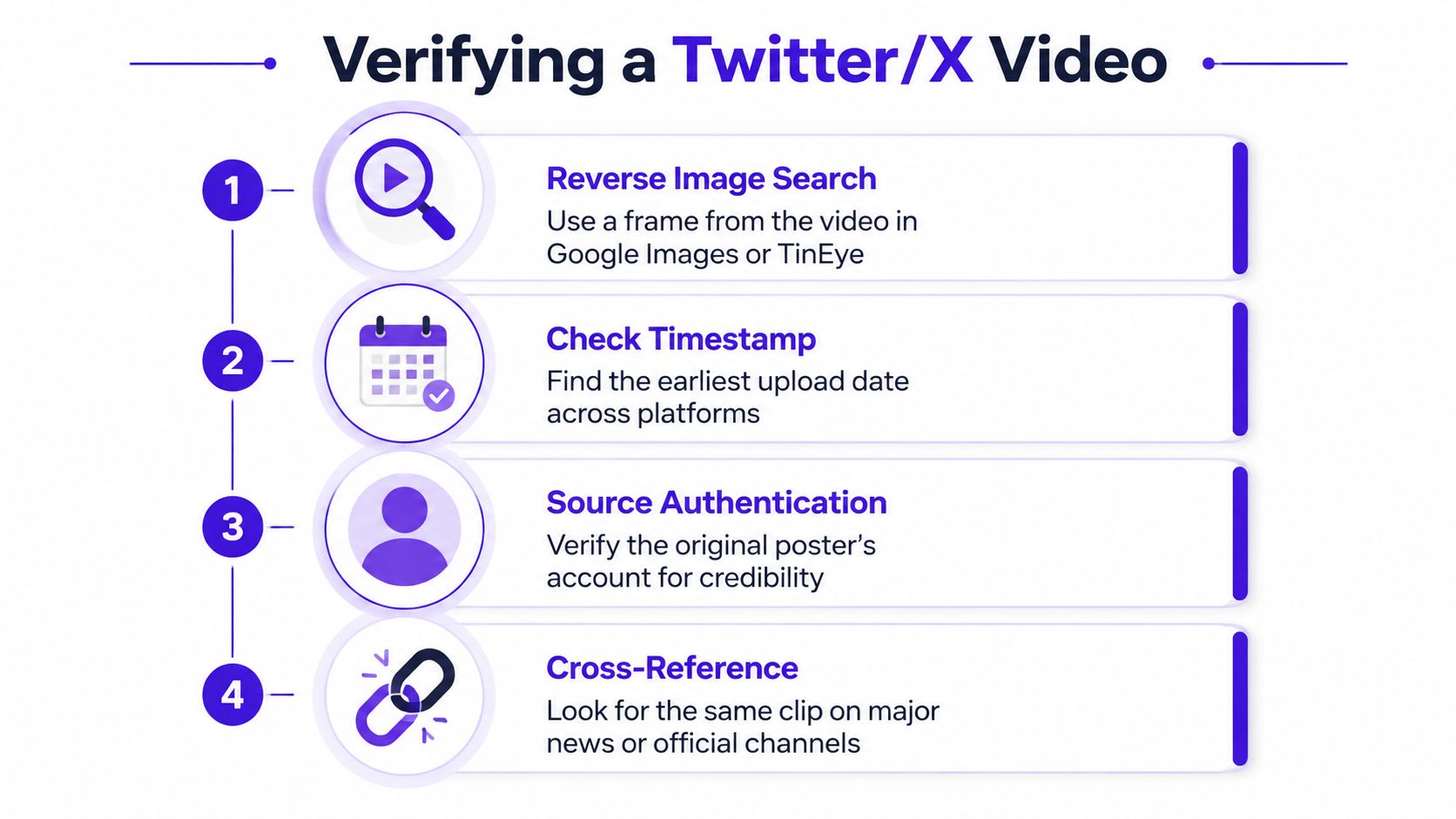
Start with a representative frame. Pause the clip where a face, sign, logo, subtitle, or watermark is visible, take a screenshot, and run it through a visual search service such as Google Images or TinEye. For very short clips, a reverse video search workflow can help, but frame selection still matters because a generic frame produces weak matches.
Trace the earliest credible source
Profile-level tracing is often more revealing than engagement counts. Open the earliest plausible uploader, inspect their surrounding posts, and check whether they describe recording the event or credit another source. Treat aggregator accounts cautiously. They can help you find copies, but their presence doesn’t establish authorship.
Cross-check visible evidence inside the clip:
- Watermarks: Look for another platform name, channel logo, or creator handle.
- On-screen dates: Compare overlays with the post date and the event timeline.
- Captions: Check whether the X caption adds a claim not supported by the footage.
- Continuity: Look for cuts, missing context, or a longer version elsewhere.
- Account history: Review whether the profile routinely posts original material or collects viral clips.
Archive checks can add another layer. Google’s cached results, where available, and the Wayback Machine may help establish how a page appeared earlier, although neither should be treated as automatic proof of authorship. Save the original post URL, screenshots, search terms, and timestamps in your research notes so another person can reproduce the path. If you manage an account while doing this work, the profile-level considerations in Twitter profile extras can help you assess the account context without confusing profile presentation with source credibility.
Short-form video often travels faster than its metadata can be checked. The result is a familiar trap: a finder locates a copy, mistakes it for the source, and republishes an unverified claim. A credible workflow ends only after the visual evidence, account history, and cross-platform timeline point in the same direction.
Rights, Attribution, and When Not to Use a Clip
Finding a video doesn’t grant permission to reuse it. Linking to the original post, embedding the X player, downloading a file for private review, and reuploading that file are different actions with different rights and platform considerations. Fair use can depend on purpose, transformation, jurisdiction, and context, so creators shouldn’t treat a short clip or public post as automatically free to publish.
Credit the apparent original poster, but don’t stop there. If that account identifies another source, credit the underlying creator where practical. Embedding or linking can preserve context better than uploading a detached file, while reuploading creates additional copyright, privacy, and takedown risks.
Third-party scrapers also deserve scrutiny. Some workflows store media or account data, and that retention can create privacy concerns or conflict with X’s terms. Use official search and profile surfaces for discovery whenever possible, document what you found, and download only when you have a clear editorial or production reason.
A sound rule is simple: find through official surfaces, verify through frames and profiles, and publish with appropriate credit. For creators who want the profile that receives this attention to convert visitors consistently, Twitter profile optimization is a separate task from finding the clip itself.
If you regularly research X videos or publish clips, use Birdy to A/B test profile elements such as your bio, banner, profile picture, and website link while you learn which presentation turns profile visits into followers or site visits. Set up a profile experiment, add UTM tracking to the website link, and compare the results alongside the videos you share.